What Is the Difference Between Account Owners, Managers, and Remote Users?
Cloudica™ uses a structured role hierarchy to manage permissions, data access, and workspace configuration. Understanding these roles ensures your team has the appropriate level of access.
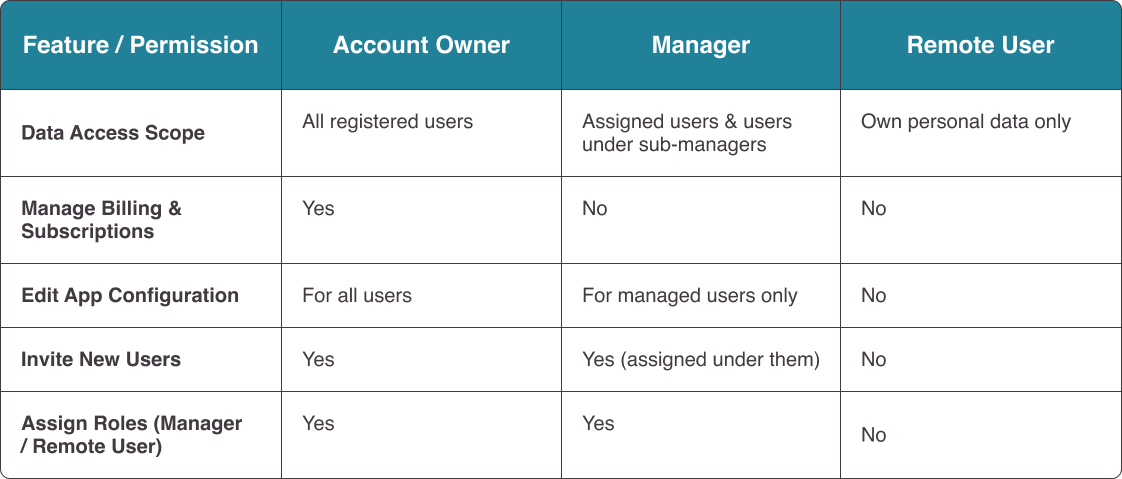
Role Hierarchy & Permissions Comparison
 Detailed Role Breakdown
Account Owner
The registered owner of the company account and the highest role in the system hierarchy. Owners have complete visibility over all user data in the organization, hold exclusive access to billing and payment settings, can adjust app configurations universally, and can assign users as Managers or Remote Users.
Manager
Team leaders who oversee specific groups or sub-teams. Managers can access activity data for users assigned directly to them, as well as users assigned to any managers beneath them in the hierarchy. They can invite new users into their structure, assign roles (Manager or Remote User), and adjust app configurations for their managed teams. They cannot access or modify billing settings.
Remote User
Standard team members focused on daily work. Remote Users can only view their own activity logs, timesheets, and settings. They cannot invite other users, manage permissions, or access company-wide data.
Detailed Role Breakdown
Account Owner
The registered owner of the company account and the highest role in the system hierarchy. Owners have complete visibility over all user data in the organization, hold exclusive access to billing and payment settings, can adjust app configurations universally, and can assign users as Managers or Remote Users.
Manager
Team leaders who oversee specific groups or sub-teams. Managers can access activity data for users assigned directly to them, as well as users assigned to any managers beneath them in the hierarchy. They can invite new users into their structure, assign roles (Manager or Remote User), and adjust app configurations for their managed teams. They cannot access or modify billing settings.
Remote User
Standard team members focused on daily work. Remote Users can only view their own activity logs, timesheets, and settings. They cannot invite other users, manage permissions, or access company-wide data.
Copyright © 2025 Cloudica LLC